The Timer
The Pomodoro cycle
| Session | Length | Setting |
|---|---|---|
| Focus | 25 minutes | Pomodoro Length |
| Short break | 5 minutes | Short Break Length |
| Long break | 15 minutes | Long Break Length |
After each focus session comes a short break. After Cycle length focus sessions in a row (4 by default) the break is long. All of these are in Settings. A new length applies at once, to the session in progress too.
Above the time, a caption says what the timer is doing: READY, FOCUS, PAUSED or BREAK. The ring fills red during a focus session and green during a break; under the time left is the time already spent. In the last minute of a focus session the time turns red.
The buttons
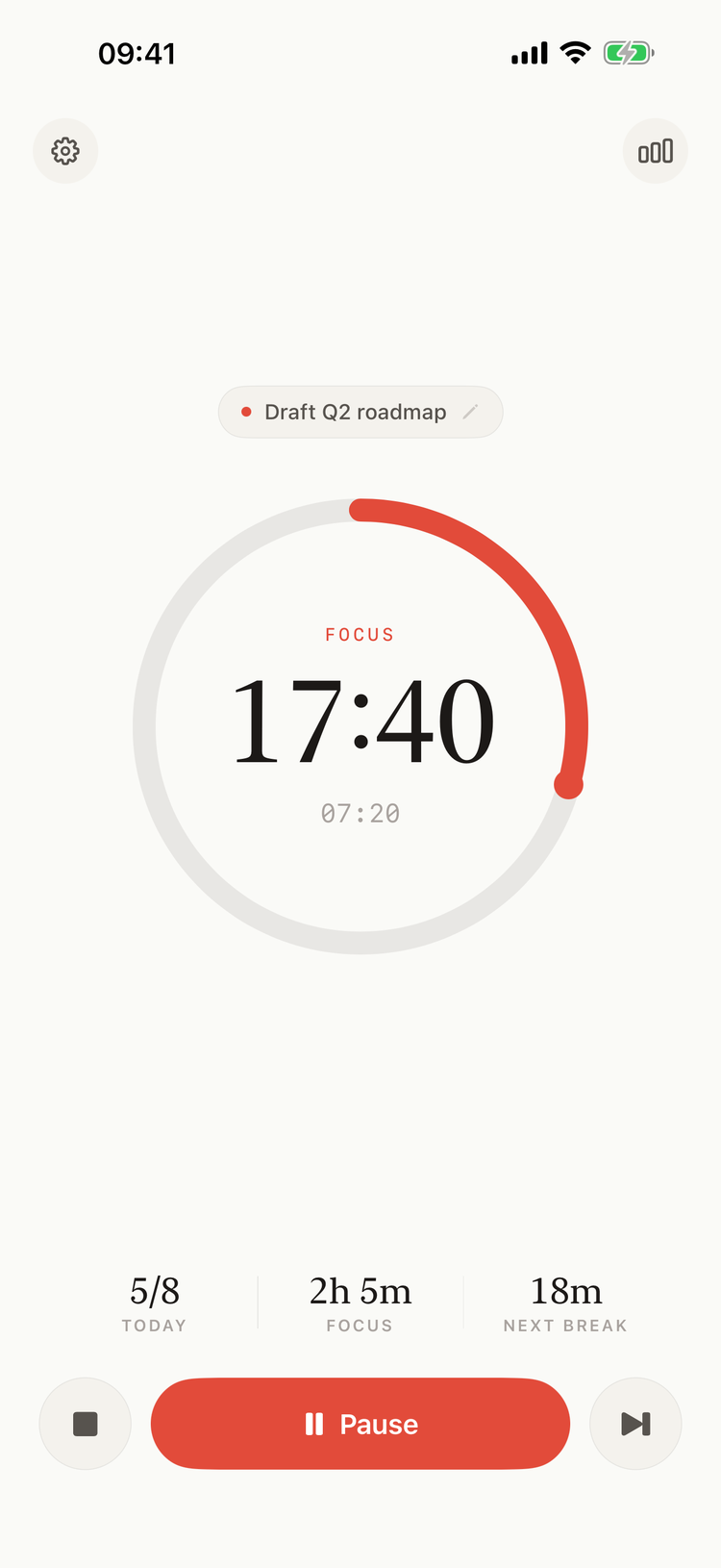
A focus session on iPhone, with Pause turned on
| When | Buttons |
|---|---|
| Ready | Start |
| Focus | Stop, Skip, and Pause if it is turned on |
| Paused | Stop, Resume, Skip |
| Break | Stop, Start (iPhone) or play (Mac) |
| Focus complete | the Focus complete card |
The Mac's panel and floating window have the same buttons; on the Mac, hover a button to see its name.
- Start begins a focus session. During a break it ends the break and begins the next focus session.
- Pause and Resume stop the countdown and go on with it. Only focus sessions can be paused, and only when Pause is turned on in Settings: it is off by default. The time on pause doesn't count; History shows the session in parts.
- Skip ends the focus session now and starts the break.
- Stop ends the session and goes back to Ready. It doesn't ask first.
A focus session that ends before its full length, with Stop or Skip, is saved as Skipped: it shows in Statistics, but doesn't count toward the daily goal or the long break. Every session is saved, however short.
When a focus session ends
The timer doesn't move on by itself. You get a notification, and the timer shows the Focus complete card:
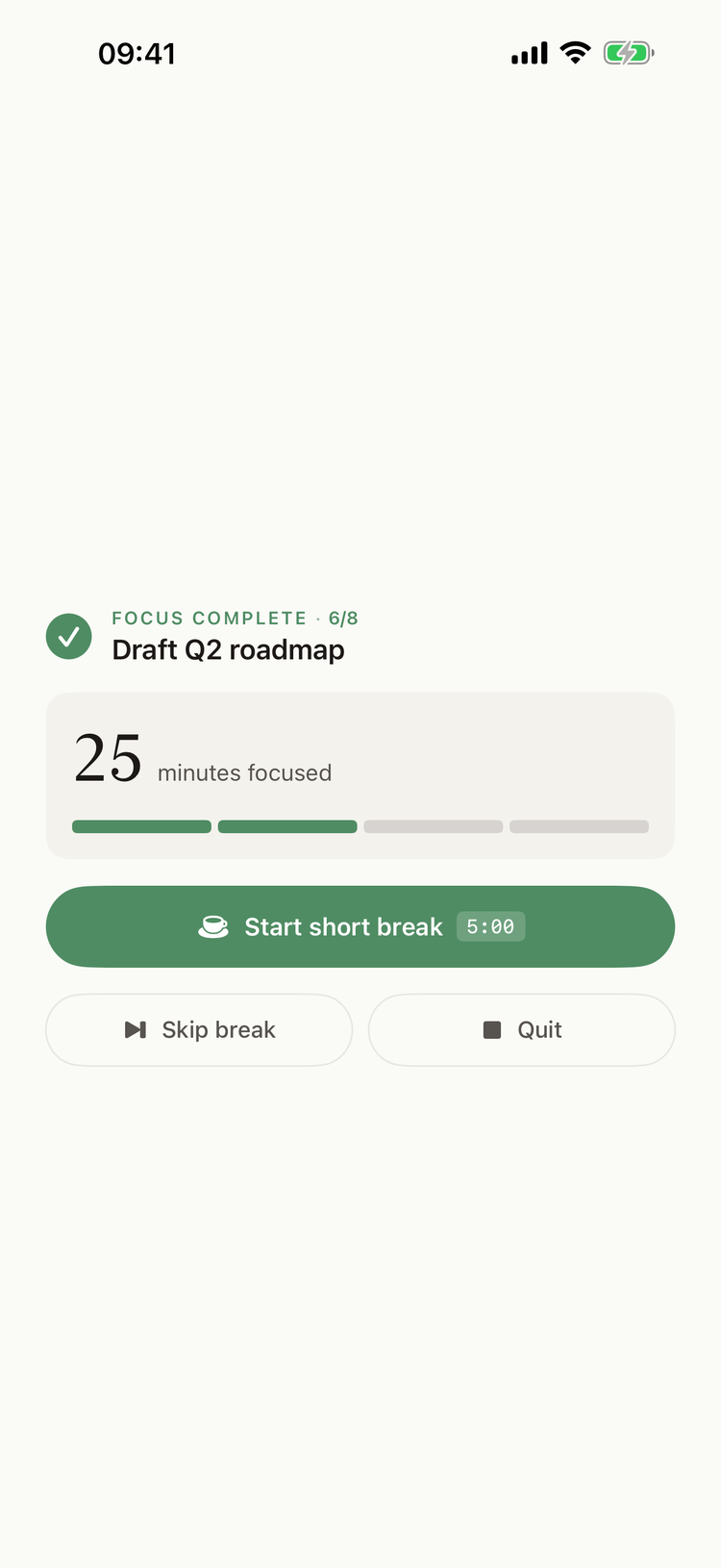
Focus complete
- FOCUS COMPLETE, with the sessions done today out of your goal, and the task.
- The minutes of this session. Until you choose what's next, they keep counting, and the extra time is saved with the session.
- A bar for each focus session of the cycle: the filled ones lead to the long break.
- Start short break, or Start long break when it is due, with the break's length.
- Skip break: no break, the next focus session starts right away.
- Quit: back to Ready. The app stays open.
Each of the three saves the focus session as completed.
On the Mac's compact floating window the card is shorter: Start break and Skip. See On Mac.
When a break ends
You get a notification, "Break completed. Start new timer?". The timer stays on the break, at 00:00, and counts the time over it until you start the next focus session.
Long breaks
A long break comes after Cycle length focus sessions completed in a row today. The count starts again:
- after a long break,
- when a focus session is stopped or skipped before its end,
- at midnight.
Skip break keeps the count going.
The daily goal
Pomodoros a day (10 by default) is your goal of completed focus sessions for the day. The timer shows how far you are: TODAY 5/8 on iPhone, "5 of 8 today" in the Mac's panel. A focus session counts as soon as it reaches its full length. You can go past the goal.
The session that reaches the goal gets its own notification, "Congratulations! Your completed your daily pomodoro goal", with its own sound (Daily Goal Completed in Settings).
When the app is closed
The timer counts from the time a session started, so it keeps time while the app is closed, the iPhone is locked or the Mac is asleep, and shows the right time when you come back.
- iPhone and iPad: the notification at the end of a session arrives with the app closed.
- Mac: the alert at the end of a session comes from the app itself, so it needs Pomodorome running. It is in the menu bar, with no Dock icon; Quit in the ••• menu closes it.